They Don't Make Laptop Keys The Way They Used To
2026-08-16
It was a night at Anthrocon. People were partying in my hotel room and I was clipping my nails half-drunk when a piece flew under the B key of my ThinkPad T14 Gen 6 I got on Black Friday last year. Unable to pick it out, I resorted to violence. Pried the keycap off and got rid of the nail. This was the precursor to a nightmare that lasted two weeks.
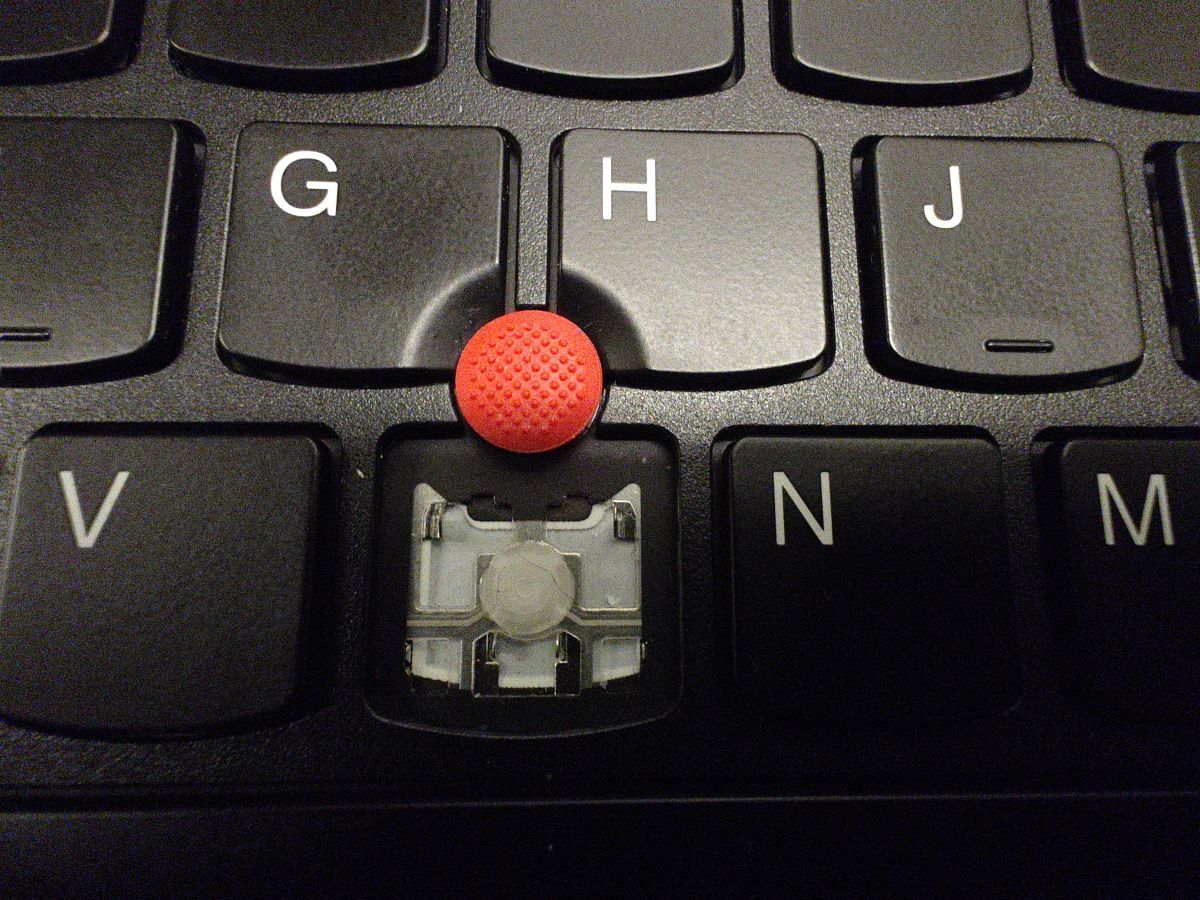
▲ Photo taken the next day
Now that the fingernail was gone, I tried to put the key back on, but it won't stay in place. It just kind of wobbled then fell off. In a fit of rage, I forced it down, so much that the entire keyboard flexed downward, but to no avail. The keycap bounced back up, and to my horror, I saw one of the scissor switch parts was broken.
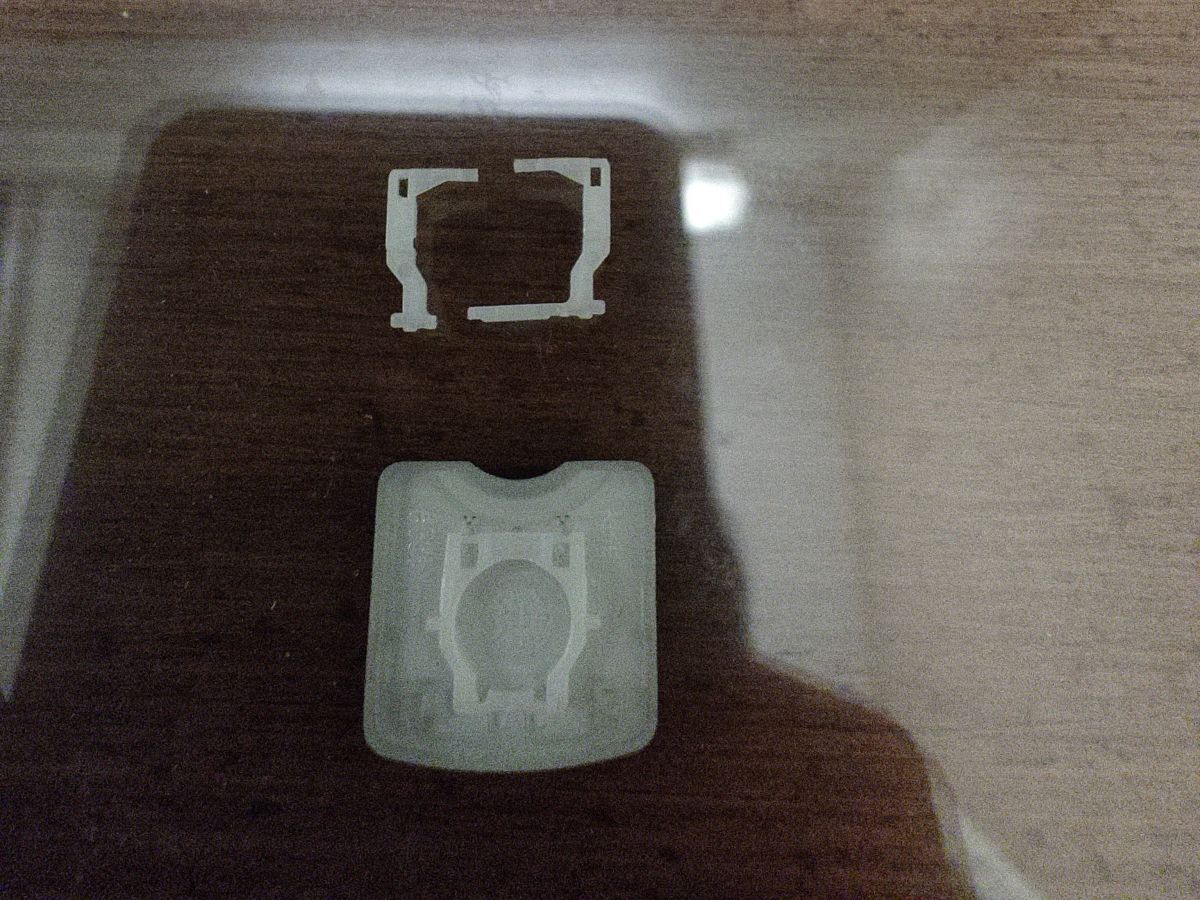
Son of a itch.
Background
So why did I pry it apart? In my defense I used to pry the keys off my dad's old E450 for fun, but those were big keys like Shift, which had the metal bracket thing. It seemed trivial to me.
And why does it matter? Because I bought the ThinkPad for the keyboard. The fact they reduced key travel from 1.8 mm to 1.5 mm was already a downgrade for me, but it was still one of the most decent keyboards in the modern laptop market. There is not a single key on this keyboard I could live without (maybe except Right Alt).
At this point I began to regret the rash decision, and took some time to inspect the mechanism called a scissor switch. It's two pieces of plastic making a (very wide) X shape, and they get fixed in place by the retainer clips on the keyboard base and the keycap. The outer piece (which I broke) is quite elastic but fragile. My goal, now, is to either fix or replace the broken part, or I'd have to replace the whole keyboard.

Options
Here are my options in order of preference:
- Fix the scissor switch somehow, if even possible
- Order a brand new scissor switch
- Buy a new keyboard
I don't think 1 would even work, and 3 would cost like $90 if I buy official, so I looked into 2. There's a website that sells these. Turns out there are four kinds of keys for my specific laptop, but the B key has a little notch at the top because it's right under the red TrackPoint, so I couldn't find it in the example images. I reached out with the photos above, but they said they didn't know either, and asked me to remove one of my regular keys. I find it ridiculous because they most certainly have a B key in stock, and all they needed to do was compare the shapes of the scissor switches. And I'm not trusting myself with another key removal. My conspiracy theory was that they just wanted to sell me one more key.

Anyway, with no other way, I reluctantly pried up the X key (the letter key I figure I used the least often) but only enough to see the inside. This confirms that my keys are "L600", so I ordered a B key, and while we're at it, a PrtSc key as well to replace the Copilot key.
Replacement
The replacement arrived in a plain envelope. I aligned the scissor switch with the retainer clips, then pressed down confidently. It did not work. No matter what I did, only two of the four retainer clips worked. So I pressed down harder and harder. Needless to say, it went worse. Within a few minutes I had broken the scissor switch. One of the holes was no longer a hole; the metal retainer clip had eaten away the edge and could now move freely in and out, which defeats the purpose of the hole. And the worst part is, it was the outer piece again, so it's not like I could piece together a working pair.
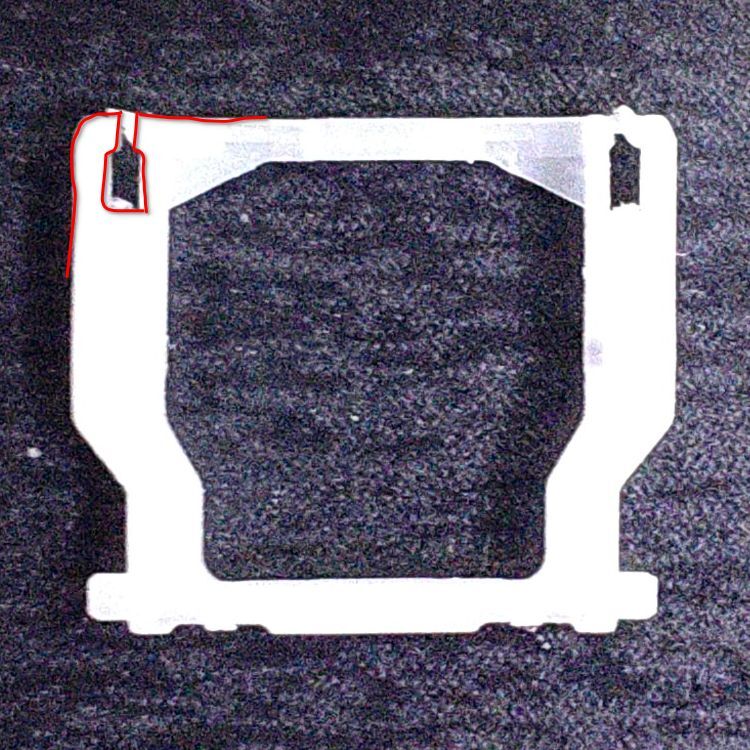
So I went back to the website again, hoping to solve the issue by the magic of buying two (more) of them. Devastatingly, they emailed me that they were out of stock. And I could not just order any other key, because the B key is special. I asked if they just had one, or nothing at all; they said nothing at all. I asked if they knew the lead time, and they did not. I guess I had bought their last B. It seemed to me that keeping their stuff in stock was not their top priority.
The good news was I managed to replace the PrtSc key, so at least I know it's possible.
Organ transplant
But hope is not dead, for I have two (2) old ThinkPads at home, one of which is an older generation in the same series (T14 Gen 3). Perhaps…?
I pried the B key off the Gen 3, only to find it was different.
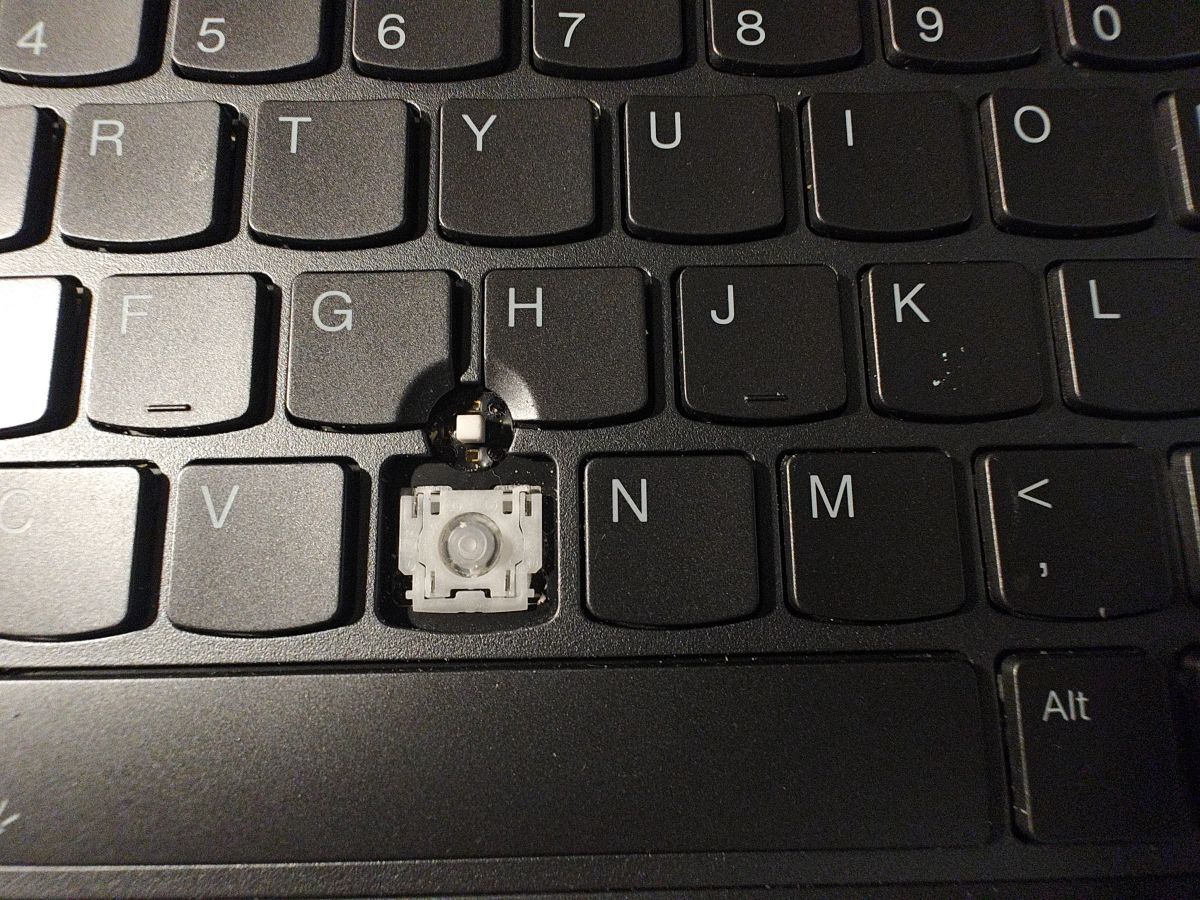
▲ Observe how the outer piece has a more abrupt change of width, compared to L600 where it's a 45 degrees-ish chamfer
But, to my delight, the even older ThinkPad E485 had the exact same scissor switch, even though it was 1.8 mm travel! I carefully harvested its organs and came back to the T14 Gen 6.
Upon closer inspection, I determined that the reason why the scissor switch won't clip and why the hole ended up broken was that the retainer clips were out of shape. You could see in the first image in the post that the top left retainer clip was slightly bent to its left. The scissor switch, though elastic, had a tight tolerance, and this was not gonna work. So I took a pair of needle nose pliers and bent it back, careful not to let it break. I also learned to be gentle when applying pressure. The first few tries did not work, but it clicked on me that it didn't have to be this way.
So far, every attempt I'd made was to first clip the scissor switch into the keycap, then jam the keycap onto the keyboard. Then I tried the other way: scissor switches on the keyboard, then keycap. This meant that the metal retainer clips on the keyboard, which are more prone to deformation, already had the scissor switch fixed in place, while I press in the keycap, which is a single molded piece of plastic. And it worked.
So, yes. A 2019 laptop that had served me faithfully for four and a half years
has proven useful again after almost three years of retirement, even if that
means being an organ donor. Thank you, bandito.
Lessons learned
If I were to time travel back to Anthrocon, I would not have pried off the key to begin with. If I did, I would have reshaped the retainer clip and put the scissor switch back first and keycap last.
All this fuss just to fix a minor inconvenience is such a first world problem, but here are a few questions:
Was I wrong about laptop keys in the 2010's easier to fix than the present? Was I unrealistic to expect that laptop keys should be as easy to remove and replace as mechanical keycaps? Why does Lenovo not sell keycaps, but only keyboards?